Free · Windows x64
Bodycam DMA cheat.
nullcam is a free Bodycam DMA cheat with player ESP, visibility checks, and live visual settings. Built for a dual-PC setup.
First time here? Read the setup guide before downloading.
Windows 10/11 x64 · Runtime included · Dual-PC reader setup
One portable app. Game updates may require a newer release.
Setup
What do I need for Bodycam DMA?
A game PC running Bodycam, a separate Windows 10/11 x64 overlay PC, and compatible DMA reader hardware. The free download includes the runtime and reader libraries; hardware is separate.
- Check the current compatibility status and run
nullcam.exeon the overlay PC. - Connect your reader, install its USB driver, and select your display.
- Start Bodycam, select Start overlay, and press 9 for visual settings.
Map visibility data downloads automatically. Keep the overlay PC online for the first visit to a supported map. No manual map export or Engine.ini edit is needed.
Release notes & checksum
Portable Windows release · build-134-6b52058a
One executable with the control panel, runtime, and reader libraries included. Settings save automatically and stay in place across updates.
Game updates may change memory layouts and need fresh validation. Automatic memory detection is the default, with an optional map for hardware that requires one.
This development release is free and runs without activation. Third-party libraries retain their licenses and notices, included in the download.
Verify the download
Compare the executable’s SHA-256 checksum with this value:
401b0bdba6ba1cb3ac38777164353f445246babf70bf8c39934b66c874c4dbd7Download checksum Optional license
The current desktop build runs without a key. You can create and manage a free development license here if you want one.
Privacy
Downloads
No account, email address, or payment information is needed. This website does not add advertising or analytics trackers. Hosting providers may process ordinary request information, including IP addresses, to deliver and protect the service.
Optional licenses
Creating a license stores a random identifier, a cryptographic hash and short suffix of your key, its status, and creation time. Your full key is not stored. No name or email is requested.
Your session
A necessary HTTP-only cookie keeps your license session signed in for up to seven days. The server stores a hash of the session token. Signing out removes the session. Keep your key to sign in again; there is no email recovery.
Service protection
License and sign-in requests are rate limited using a daily hash of the request IP address. Expired counters and sessions are removed during subsequent license requests. This information is not used for advertising.
Deletion
Sign in with your key and choose “Delete free license” to remove the license and all its website sessions. The current desktop build still works without a license.
Payments
Payments are disabled. This site does not collect billing details or charge for licenses. Any future paid service would require a separate, explicit choice and updated billing information.
Desktop application
This policy covers the website. The desktop application runs independently and can write settings and diagnostic files locally on your computer. It downloads shared map visibility data from nullcam.dev and saves verified files for offline use. These downloads do not send player names, poses, memory contents, or diagnostic reports.
Inside nullcam
Per-bone visibility.
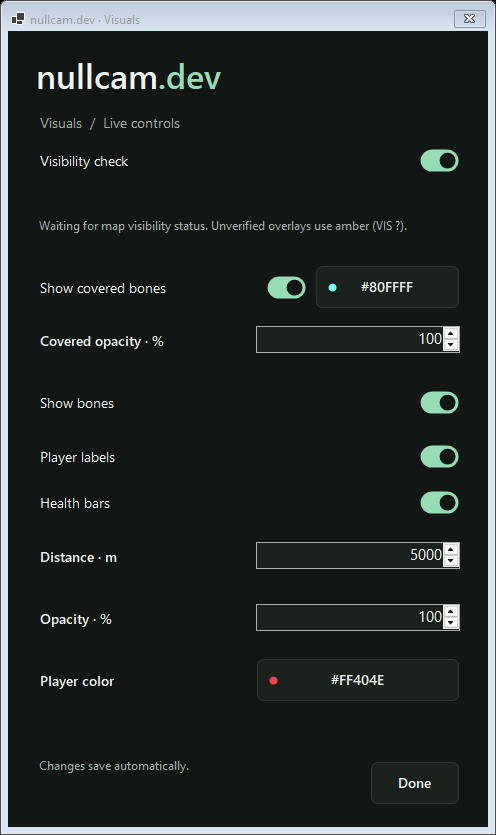
Live controls.
Visibility is checked for individual bones and limb segments, so visible and covered parts of a player can be drawn separately.
- Show or hide covered bones, with their own color and opacity.
- Toggle bones, player labels, health bars, and visibility checks.
- Adjust ESP distance, player color, and marker opacity.
Press 9 to customize. Changes save automatically.
Visibility needs matching map and game-build data. Unverified visibility stays amber (VIS ?).
Development & feedback
nullcam is free during development. Expect bugs and compatibility changes; it will become paid once the software is stable.
Follow updates and share bug reports in the nullcam discussion on elitepvpers.